Backpacks
Содержание:
Устаревшее[]
| Изображение | Название | Описание | Размеры (слотов) |
|---|---|---|---|
| Рюкзак Края | Переносной аналог сундука Края. | 27 | |
| Малый рюкзак крафта | Имеют интегрированную сетку крафта. | 9 | |
| Большой рюкзак крафта | 18 |
Действия над рюкзаками
Рюкзаки можно перекрашивать, переименовывать и расширять. Подробнее о каждом действии смотрите ниже.
Перекраска
Перекраска рюкзаков (старая версия)
Все рюкзаки могут быть окрашены в один из 17 цветов (включая исходный). Для этого поместите рюкзак в сетку крафта и добавьте к нему краситель. Для возвращения рюкзаку исходного цвета добавьте к нему ведро воды. Ведро воды остаётся.
В старых версиях:
все рюкзаки, кроме рюкзака Края и рюкзаков крафта, могут быть окрашены в один из 17 цветов (включая исходный). Для возвращения рюкзаку исходного цвета добавьте к нему кожу или дублёную кожу (в зависимости от размера рюкзака). Рюкзак можно скрафтить уже окрашенным, если во время создания добавить краситель в центр сетки крафта.
Ношение на спине
Рюкзак на спине игрока
Любой рюкзак можно носить на спине. Для этого нужно одновременно нажать кнопку приседания (по умолчанию ⇧ Левый Shift) и кнопку открытия рюкзака (по умолчанию B, можно сменить в настройках). В открывшемся окне есть специальный слот, куда нужно поместить рюкзак. Надетый рюкзак отображается на спине игрока и может быть открыт клавишей B.
Взаимодействие с сундуками и оборудованием
Любой рюкзак можно(проверенно на версии игры 1.6.4 с версией мода 1.18.17) открыть в месте с окном инвентаря, путём нажатия
⇧ Левый Shift+ПКМ с рюкзаком в руке на сундуке\оборудовании и пр. блоками имеющими инвентарь.
Features
- High version compatibility — Backpacks supports a vast number of old versions and will most like support many more to come. Even if a version isn’t explicitly stated as being supported, give it a try.
- NBT Data Storage — Backpack data is stored in that item’s NBT data (the same way Minecraft stores data about enchantments). This means you don’t have to worry about databases, configs, or anything like that. You can even backup the world and all of the backpack’s contents will be backed up with it.
- Fully functioning backpack item — Backpacks from this plugin are just like backpacks from the mod. They can be traded, destroyed, cloned, etc.
- Different backpack types — This plugin introduces many different backpack types that extend far beyond just simply storage. Check them out under the crafting section of this page.
- Highly customizable — Almost every aspect of the backpacks is customizable, including the crafting recipe! So if you don’t like the default recipes, change them to something you do.
- Multilingual support — Backpacks uses a proprietary automatic translation system known as i18nExtractor in its build chain. This means that you can automatically translate Backpacks into ANY language supported by Google Translate. See the GitHub about building Backpacks in your language.
Commands
- /bp — Shows help information.
- /bp help — Also shows help info.
- /bp config:reload — Reloads the configuration.
- /bp info — Displays info about the plugin.
- /bp item:info — Lists NBT data keys about the item you are holding.
- /bp item:info:get — Gets the type/data of a particular NBT data key.
- /bp item:give — Gives a player a backpack.
- /bp split — Splits a combined backpack.
- /bp materials — Lists all item types available to custom recipes in the configuration.
- /bp materials:search — Searches all of these materials for a specified one.
- /bp vfurnace — Lists all virtual furnaces and that vfurnace’s current inventory location, whether it be a chest, player’s inventory, the ground, etc. Note: A virtual furnace is the underlying furnace operation tied to a furnace backpack.
Интересные факты[]
- В версиях модификации 1.12.13 и более ранних рюкзаки можно было носить в слоте для кирасы. Отдельного слота для них не было.
- В ранних версиях средние рюкзаки в инвентаре творческого режима был под названиями item.backpack.medium.name, но они не имели текстуры и не могли быть использованы по назначению.
- Использование модификации Smart Moving вместе с Backpacks приводит к неправильному отображению 3D модели на спине игрока: модель не поворачивается за камерой игрока (заметно только с видом от 3-го лица). Такая ошибка возникает и с другими модификациями, добавляющими броню нестандартной формы.
- С версии 2.0.0 Backpacks получил собственную вкладку в инвентаре Творческого режима. До этого рюкзаки хранились во вкладке «Разное». Материалы для их крафта находятся во вкладке «Материалы».
- C версии 3.0.0 Backpacks изменилась система крафта рюкзаков. Добавились рамки и их рецепты.
Просмотр: Шаблон:BPS/Содержимое
More Bags We Like
Honorable Mentions
We’ve tried tons of backpacks. The ones listed here are all good choices that we think you’ll be happy with depending on your need and budget.
Aer Designs Slim Pack for $115 We like this bag for quick trips where you don’t need to carry everything you normally keep at your desk. It’s just 8.5 liters—that’s less than half of some of our picks—but it still fits a laptop and charger, wallet, water bottle, phone, plus a snack, a mask, and hand sanitizer. Its durable polyurethane coating can be easily wiped clean.
STM Goods Myth 18L Backpack for $120 Reviews editor Julian Chokkattu found that, despite the Myth’s compact 18-liter size, he could easily fit a 16-inch MacBook Pro and accessories inside. The laptop is suspended to not get damaged in an accidental drop, and the thick padding helps it sit comfortably on your back. There’s a handy loop you can use to hang earbuds or cables and a microfiber-lined top pocket for fragile stuff, but no side pockets for a water bottle or umbrella.
Targus 2 Office Antimicrobial Backpack for $120: Julian was a fan of this bag too, which is intended for folks who frequently switch between working from home and working at the office. Two pouches on the front attach via a looped Velcro strap, so you can easily remove them if you want to pack light. The primary touchpoints on the backpack near the zippers have an antimicrobial protective finish, which Targus says will prevent the growth of microorganisms. Don’t expect this to do much, but it might give you some peace of mind.
Incase Icon Backpack with Woolenex for $200 Incase has lots of backpack options, but Adrienne likes the low profile and durable weave of the Icon series with Woolenex (Incase’s proprietary wool-polyester fabric blend). It’s abrasion-resistant and repels moisture but looks much more polished and feels more fabric-like than nylon.
Mission Workshop Rhake for $380 This roll-top bag has a ton of pockets and its two-layer weatherproof construction and Velcro closures keep the contents of the main compartment dry. It’s not particularly fast or easy to access many of these pockets, it’s really heavy, and while it looks cool, the price is quite steep.
Dagne Dover Dakota Backpack for $145 Dagne Dover bags are attractive and fit everything, with a loop to attach to luggage. Neoprene may be water-resistant and vegan, but it’s . The company says it is working toward being more eco-conscious. We didn’t try the Vida Tote ($145), but it holds a 13-inch laptop and is made of organic cotton if you want to try a different material.
Developer API
API_GetBackpackContainer
Returns a reference to the underlying of a player’s backpack. Returns if the player essentially has no backpack (no data file and no backpack in-memory).
Notes:
- This will create the container entity if it doesn’t exist. This can add load to the server, so it’s recommended to use this API only if the other API methods do not meet your needs. For example, if you want to know only the quantity of an item in the player’s backpack, you can use which can count the items without creating the container.
- You should avoid caching the container because several events may cause the backpack’s underlying container to be replaced or deleted, which would make the cached reference useless.
API_GetBackpackItemAmount
Returns the quantity of a given item in the player’s backpack. Returns if the player has no backpack. This API is more performant than because it does not require creating the backpack container.
API_DropBackpack
Drop the player’s backpack at their current position. This can be used, for example, to only drop the player’s backpack when they die in a PvP zone.
Note: This intentionally ignores the player’s permission in order to provide maximum flexibility to other plugins, so it’s recommended that other plugins provide a similar permission to allow exemptions.
Erases the contents of a specific player’s backpack.
Note: This cannot be blocked by the hook.
API_GetExistingBackpacks
Returns all backpack containers that are cached in the plugin’s memory, keyed by the Steam IDs of the backpack owners. This was originally contributed so that item cleaner plugins could determine which items were in backpacks in order to ignore them. However, as of Backpacks v3.7.0, all item cleaner plugins should automatically be compatible if they verify that the container has a valid .
Crafting
All of the recipes are customizable through the configuration, but here are the defaults
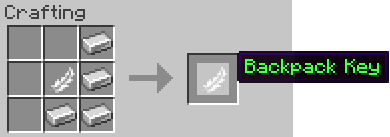
Key — Used to open the backpacks.
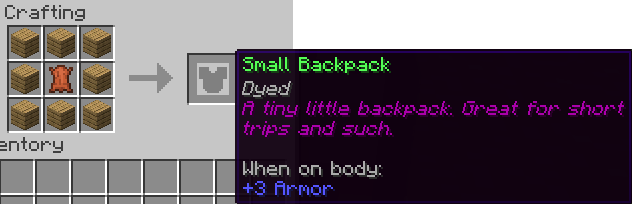
Small — Smallest of the backpacks. Size of normal chest.
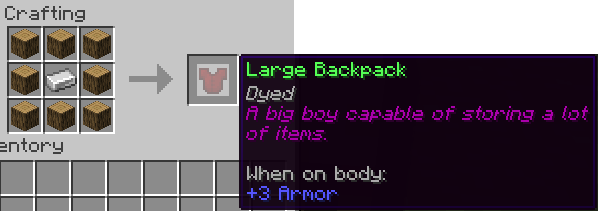
Large — A pretty dang large backpack. Size of double chest.
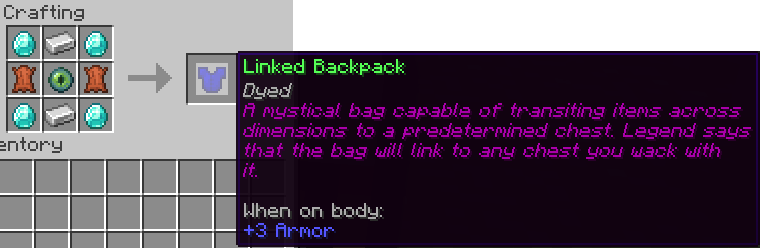
Linked — A backpack capable of interfacing with many different types of containers: chest, double chests, furnaces, etc. It works at any distance, even across dimensions. It is the ultimate backpack.
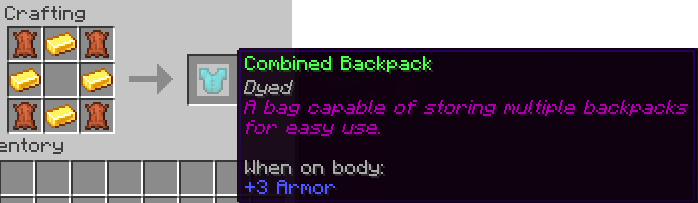
Combined — A backpack which can store multiple backpacks for quick use.
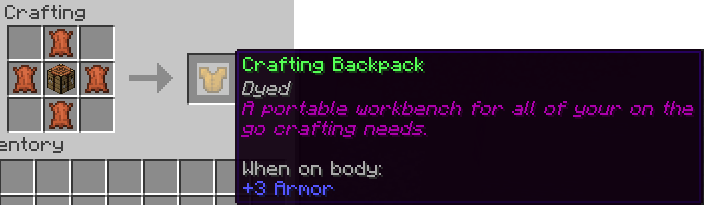
Craft — A crafting table in a backpack.
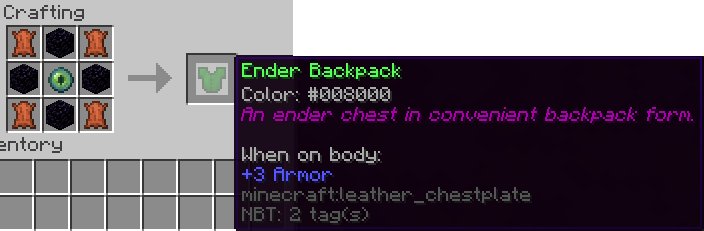
Ender — An enderchest in a backpack.
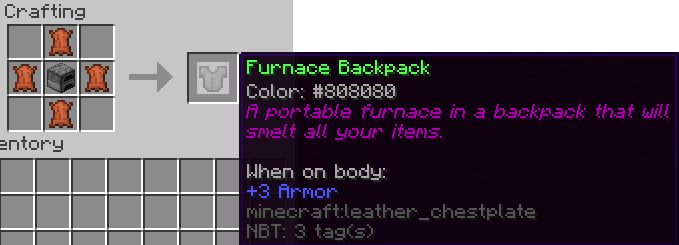
Furnace — A first of its kind portable furnace.