Microsoft paint
Содержание:
Canvases[]
There are 26 paintings in the game. These are mostly based on paintings by Kristoffer Zetterstrand, who also created the Minecraft versions.
| Canvas | Size | Original | Name | Resource location | Description | Java Edition version added |
|---|---|---|---|---|---|---|
| 1×1 blocks16×16 pixels | Alban | A man wearing a fez in a stood next to a house and a bush. As the name of the painting suggests, it may be a landscape in Albania. | Indev 20100223 | |||
| 1×1 blocks16×16 pixels | Aztec | Free-look perspective of the map de_aztec from the video game Counter-Strike. | Indev 20100223 | |||
| 1×1 blocks16×16 pixels | Aztec2 | Free-look perspective of the map de_aztec from the video game Counter-Strike. | Indev 20100223 | |||
| 1×1 blocks16×16 pixels | Bomb | Painting of the map de_dust2 from the video game Counter-Strike, named “target successfully bombed» in reference to the game. | Indev 20100223 | |||
| 1×1 blocks16×16 pixels | Kebab | A kebab with three green chili peppers. | Indev 20100223 | |||
| 1×1 blocks16×16 pixels | Plant | Still life painting of two plants in pots. “Paradisträd» is Swedish for “money tree», which is a common name for the depicted species in Scandinavia. | Indev 20100223 | |||
| 1×1 blocks16×16 pixels | Wasteland | Painting of a view of some wastelands; a small animal (presumably a rabbit) is sitting on the window ledge. | Indev 20100223 | |||
| 2×1 blocks32×16 pixels | Courbet | Two hikers with pointy beards seemingly greeting each other. This painting is based on Gustave Courbet’s painting The Meeting or «Bonjour, Monsieur Courbet». | Indev 20100223 | |||
| 2×1 blocks32×16 pixels | Pool | Some men and women skinny-dipping in a pool over a cube of sorts. Also there is an old man resting in the lower-right edge. | Indev 20100223 | |||
| 2×1 blocks32×16 pixels | Sea | Painting of a view of mountains and a lake, with a small photo of a mountain and a bright-colored plant on the window ledge. | Indev 20100223 / Alpha v1.1.1 | |||
| 2×1 blocks32×16 pixels | Creebet | Painting of a view of mountains and a lake, with a small photo of a mountain and a creeper looking at the viewer through a window. | Alpha v1.1.1 | |||
| 2×1 blocks32×16 pixels | Sunset | Painting of a view of mountains at sunset. | Indev 20100223 | |||
| 1×2 blocks16×32 pixels | Graham | Painting of King Graham, the player character in the video game series King’s Quest. | Alpha v1.1.1 | |||
| 1×2 blocks16×32 pixels | Wanderer | A low-resolution version of Caspar David Friedrich’s famous painting Wanderer above the Sea of Fog. | Indev 20100223 | |||
| 2×2 blocks32×32 pixels | Bust | Painting of a bust of Marcus Aurelius surrounded by pixelated fire. | Indev 20100223 | |||
| 2×2 blocks32×32 pixels | Match | A hand holding a match, causing pixelated fire on a white cubic gas fireplace. | Indev 20100223 | |||
| 2×2 blocks32×32 pixels | Skull and Roses | Painting of a skeleton at night with red flowers in the foreground. The original painting is different, depicting a woman sitting in a couch, while the skull is in the middle of a body of glacial water of sorts. | Indev 20100223 | |||
| 2×2 blocks32×32 pixels | Stage | Painting of scenery from Space Quest I, with the character Graham from the video game series King’s Quest. | Indev 20100223 / Alpha v1.1.1 | |||
| 2×2 blocks32×32 pixels | Void | Painting of an angel praying into what appears to be a void with pixelated fire below. | Indev 20100223 | |||
| 2×2 blocks32×32 pixels | – | Wither | Painting depicting the creation of a wither.
This is the only painting not based on a real painting. |
Java Edition 1.4.2 (12w36a) | ||
| 4×2 blocks64×32 pixels | Fighters | Two pixelated men poised to fight. Paper versions of fighters from the game International Karate +. | Indev 20100223 | |||
| 4×3 blocks64×48 pixels | Donkey Kong | A paper-looking screenshot of the level 100 m. from the arcade game Donkey Kong. | Alpha v1.1.1 | |||
| 4×3 blocks64×48 pixels | Skeleton | A painting of the “Mean Midget» from the adventure game Grim Fandango. | Alpha v1.1.1 | |||
| 4×4 blocks64×64 pixels | Burning Skull | A Skull on pixelated fire; in the background there is a moon in a clear night sky.This painting is based on a Minecraft screenshot, with the grass block and a 3D skull added on top.
(See the section for more info.) |
Beta 1.2_01 / Beta 1.3 | |||
| 4×4 blocks64×64 pixels | Pigscene | Painting of a girl that is pointing to a pig on a canvas. In the original version, the canvas shows red, green and blue blocks, representing the three colors of the RGB color model that is typically used by computer displays. | Alpha v1.1.1 | |||
| 4×4 blocks64×64 pixels | Pointer | A painting of the main character of the game International Karate + in a fighting stance touching a large hand. It could also be interpreted as a play on Michelangelo’s famous painting The Creation of Adam. | Indev 20100223 |
Bedrock Edition
In Bedrock Edition, there are four additional 2×2 tile paintings with no clear purpose or use. See for more information.
Speech Recognition
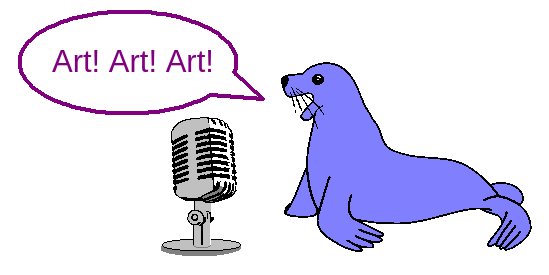
Using only your voice, you can switch tools and colors, pan the view, click on buttons on the screen by name, and use most menu items.
You can even say «draw a cat in a party hat» to have JS Paint try to sketch a cat in a party hat.
This feature pairs well with Eye Gaze Mode for a more complete hands free experience.
The feature is only available on Chrome, and only understands English.
Note that Chrome sends your voice to Google servers.
Access with Extras > Speech Recognition. If this option is grayed out, your browser is not supported.
JS Paint will show what it thinks you said in the status bar at the bottom of the screen.
There are many synonyms for commands, and often you can do things with very short phrases like «Curve» to switch to the Curve tool.
If it’s not recognizing your voice for short commands like «Curve» or «Cut», you may want to try longer phrases like «Curve tool» or «Cut selection»,
as this helps it distinguish the sound as speech, rather than a cough for instance.
Fixes
Menu buttons are easier to open on a touch screen. Sometimes you had to tap twice before the menu opened.
Fixed large square brush continuity (it left gaps before, due to a half-implemented optimization).
The selection and textboxes no longer «blow up» if you resize them to a minimal size.
They are now limited when you drag an edge past the opposite edge.
Fixed a bug where vertically thin selections were difficult or impossible to drag (despite showing a drag cursor).
(The draggable region was offset outside of the selection box.)
Fixed a similar bug where tool previews would get offset if the canvas’s height was very small.
Resize handles no longer get smaller when the object to resize is very small.
The draggable region for handles no longer gets smaller either, except in dimensions where it must.
It’s now considerably smarter than Windows 10 about where it lets you drag handles from.
In Image > Flip/Rotate, you can now click the custom degrees input field before selecting the «Rotate by angle» option.
The magnifier preview and other tool previews are now hidden while dragging the Colors box or Tools box.
It looked confusing when the magnifier preview was shown at the same time as
the preview outline for dragging/docking a tool window.
For languages that read right-to-left, the History view (Edit > History) now uses a right-to-left layout,
and the color box and tool box no longer flip their layout when dragging them into a window or docking them back to a side of the application.
The history view and error messages use more localized text.
Fixed cut off icons in buttons in the help window toolbar in the Modern theme.
All windows now have a default-focused control, and the last focused control in the window is remembered for when you refocus the window.
File > New and File > Open now create a new autosave session,
instead of using the current session.
History[]
| Java Edition Indev | |||||
|---|---|---|---|---|---|
| Added paintings. | |||||
| There are currently 19 canvases, which can be viewed at Java Edition history of textures/Paintings. | |||||
The crafting recipe of paintings uses eight planks.
|
|||||
| Painting textures are currently stored on a texture atlas called kz.png. | |||||
| Java Edition Infdev | |||||
| 20100227-1 | The crafting recipe has of paintings has been changed, so that it now uses sticks, rather than planks.
|
||||
| Java Edition Alpha | |||||
| v1.1.1 | Added five more painting canvases, for a total of 24. | ||||
| The textures of two paintings have been changed. | |||||
| Java Edition Beta | |||||
| 1.2_01 | Added a new painting, although it uses an untextured part of kz.png due to the painting texture not yet being implemented. | ||||
| 1.3 | The texture of the new painting, has been added to the part of kz.png displayed by the new painting. | ||||
| Custom paintings are mentioned by Notch. | |||||
| 1.7.3 | Paintings pushed by pistons now pop off. | ||||
| Java Edition | |||||
| 1.4.2 | 12w36a | Added new painting canvas ‘Wither’. | |||
| Paintings can now be placed overlapping one another. | |||||
| 1.8 | 14w10a | Paintings can no longer be placed directly inside of each other. | |||
| 1.9 | 15w49a | Paintings can no longer be destroyed by lightning. | |||
| 15w50a | Added sounds for placing and breaking paintings: and . | ||||
| 1.11 | 16w32a | The entity ID for paintings has been changed from to . | |||
| 1.12 | 17w06a | Paintings now have a more intuitive placement system. When placed, a painting always uses the maximum possible amount of available space. | |||
| 1.13 | 17w47a | Prior to The Flattening, this item’s numeral ID was 321. | |||
| 18w02a | Paintings now use a resource location for their motive. | ||||
| 1.14 | 18w43a | The item texture of paintings has been changed. | |||
| 19w07a | Paintings are now stored as individual image files instead of parts of a single large image file, and now support animations. | ||||
| 19w11a | Shepherd villagers now sell paintings. | ||||
| 1.17 | 21w11a | The painting back texture has been updated to be in line with the texture update. | |||
| Pocket Edition Alpha | |||||
| v0.5.0 | Added paintings. | ||||
| There are currently 25 canvases, which can be viewed at Bedrock Edition history of textures/Paintings. | |||||
| v0.8.0 | build 3 | A new painting rendering has been added.[more information needed] | |||
| v0.12.1 | build 1 | Paintings are no longer available from the nether reactor. | |||
| v0.15.0 | build 1 | Paintings now have sounds when placed and broken. | |||
| Pocket Edition | |||||
| 1.0.7 | Added new painting canvas ‘Wither’. | ||||
| Bedrock Edition | |||||
| 1.10.0 | beta 1.10.0.3 | The item texture of paintings has been changed. | |||
| 1.11.0 | beta 1.11.0.4 | Paintings can now be bought from shepherd villagers. | |||
| 1.17.0 | beta 1.17.0.50 | The painting back texture has been updated to be in line with the texture update. | |||
| Legacy Console Edition | |||||
| TU1 | CU1 | Patch 1 | 1.0.1 | Added paintings. | |
| There are currently 25 canvases, which can be viewed at Legacy Console Edition history of textures/Paintings. | |||||
| TU11 | The limit for paintings in a world has been increased. | ||||
| A message is now displayed when the maximum paintings are reached. | |||||
| TU14 | Added new painting canvas ‘Wither’. | ||||
| TU43 | CU33 | Patch 13 | Added sounds for paintings. | ||
| The item texture of paintings has been changed. | |||||
| New Nintendo 3DS Edition | |||||
| 0.1.0 | Added paintings. | ||||
| There are currently 25 canvases, which can be viewed at New Nintendo 3DS Edition history of textures/Paintings. |
Pixel Perfect
All interface elements are now thematically styled,
powered by OS-GUI.js and
98.css.
The whole interface is now pixel perfect accurate to Windows 98.
(Okay, there’s a few things that are a pixel off or so, but seriously,
I lined up a screenshot and got it essentially perfect.)
Improved layout of View > Zoom > Custom Zoom window, matching the design in MS Paint.
Added padding to all dialogs so they don’t feel cramped anymore.
Message boxes now include warning or error icons, and play a sound when they appear.
Improved View > View Bitmap: it now uses the theme’s wallpaper background color,
if the image is smaller than the window.
It now closes with a click or key press, and doesn’t let you edit the image (which was weird).
The Help window can now be minimized to the bottom of the screen, even though there’s no taskbar.
It works like how Windows 98 does if the process managing the taskbar crashes.
Trivia[]
- On April 26, 2011, Notch stated that the automapping code can be used to share custom paintings and books in the future.
- If a player is standing behind a painting, other players do not see their name.
- Paintings are not actually attached to the wall. When looked at closely, there is a visible gap between the painting and the wall.
- The texture on the back of a painting is the same as the wooden planks texture, but with a yellowish color similar to that of chests but slightly darker.
- Because paintings can be passed through and can be placed on blocks that can also be passed through, players often use paintings to create secret doorways.
- The «Skull on Fire» painting contains a Minecraft world in the background, which is based on a screenshot taken by the artist in Alpha 1.1.2_01 (or earlier) on October 12, 2010, at 13:22:49 (UTC+2).
The seeds for this world are -1044887956651363087 and -6984854390176336655 (both are the same), standing at X=-249.65, Y=91, Z=-29.04.
- The «Skull on Fire» painting’s texture was added in Beta 1.3. However, the code for paintings to randomly display the part of the Kz.png texture that was to be occupied by the Burning Skull painting was added earlier, in Beta 1.2_01. As there was nothing on this part of the texture except for a purple background grid, this is what would be displayed if the painting was randomly chosen, until the Burning Skull painting texture was actually added.
Usage[]
Placement
Paintings can be placed on the sides of solid blocks, or signs. The other blocks holding the painting can be almost anything. There are several different sizes of paintings (see below). When placed, a painting checks for the largest amount of space it has. It then chooses a random painting of that size. The player can add blocks around the painting to ensure it is the size wanted. When the supporting blocks are removed, the painting breaks after 20 game ticks (1 second) if no supporting blocks are replaced during that interval.
Properties
Being an entity, paintings can simultaneously exist in the same space as blocks such as water or torches. Specifically, they can share the space with any block whose collision box does not intersect its hitbox.
Players and mobs are able to walk through paintings, as long as the blocks supporting the painting allow it. Light propagates through paintings as well.
Paintings are non-flammable.
New Features
View > Zoom > Show Thumbnail to show a preview of the image at a small size, great for pixel art.
Make fine, precise edits, while keeping it all in perspective.
Pinch zooming: If you have a touch screen, use two fingers to zoom in and out, and pan the view.
Alt+Mousewheel to zoom in and out quickly on desktop.
Unlike the Magnifier tool, this allows you to zoom while making (or moving) a selection, for added precision.
Added View > Fullscreen to toggle fullscreen mode. This is nice for using JS Paint on your phone.
The Text tool now automatically expands the textbox as you type.
When resizing, there’s now a minimum size based on the text in the textbox.
It previews exactly what size it will end up with when resizing.
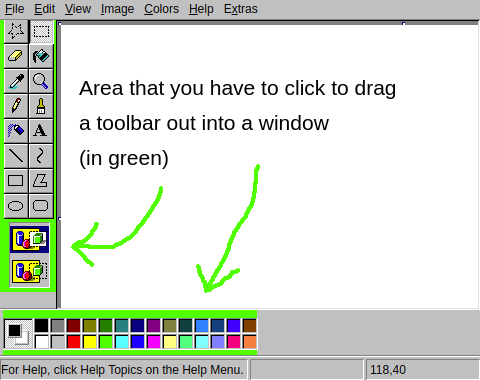
Docking: If you drag the Colors box or Tools box out into a window,
you can now dock it back when dragging the titlebar.
Previously to dock it you had to double click the titlebar, or drag it by the edge of the window.
Menus are now fully keyboard (and screen reader) accessible.
In particular, you can hold Alt and press the access key of a menu button to open the menu,
and then (without Alt) press the access key of a menu item to select it.
The access key of an item is the underlined letter, or the first letter of the item’s text if there’s no underline.
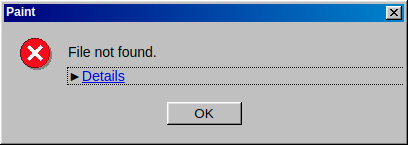
Error details are now hidden by default in error dialogs.
The details may be more overwhelming than useful in a lot of cases,
but if you need them, you can expand the details.
File > Exit now exits to the official web desktop,
98.js.org,
a re-creation of Windows 98, full of games and applications.
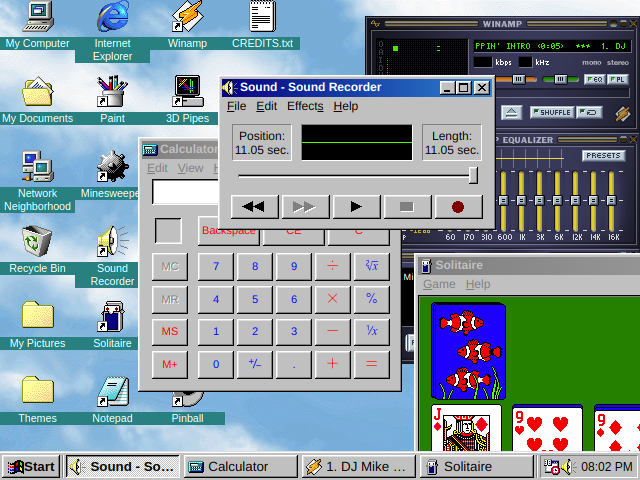
This project spun out of JS Paint, and I have implemented now
Sound Recorder, Notepad, Calculator, and even Windows Explorer,
to a high level of detail.
It also includes projects from other people, other recreations of old programs,
like Webamp,
a meticulous recreation of Winamp,
and JS Solitaire,
a Solitaire clone (I tweaked it for accuracy, adding the card back images, etc.)
Eye Gaze Mode
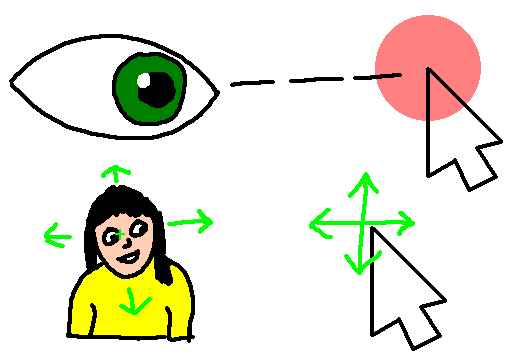
Eye Gaze Mode lets you control JS Paint without using your hands.
It’s intended for use with an eye tracker, head tracker, or other coarse input scenario.
You don’t need a thousand-dollar eye tracker device to play around with this, just a webcam and some free software.
I recommend Enable Viacam, which is not an eye gaze tracker,
but rather a general video movement tracker that you can set up to track your head movement (or your torso or hand or anything else).
Eye tracking via a webcam has a ways to go, but it’s also pretty amazing in its own right.
Try GazePointer.
Eye gaze tracking requires significant calibration, and if the calibration is off,
it’s hard to use because you can’t look where you want to look to interact with things.
This is why I recommend head tracking (if that’s an option for you),
because then you can freely look around, and control the cursor independently,
so if it gets offset, you can just tilt your head a bit.
Eye Gaze Mode is built mainly for people with movement disabilities like ALS or Cerebral Palsy,
but it can also just be a sort of magical experience.
It can also be frustrating, and takes some practice to master.
A good place to start is coloring line art using just the Fill tool ():
-
Find coloring pages online,
and copy and paste them into JS Paint. -
You can convert them to black and white in Image > Attributes, and then switch back to Colors.
(This makes it work better with the Fill tool.) -
Enable Eye Gaze Mode with Extras > Eye Gaze Mode and note that it will start clicking where you hover.
You can disable this dwell clicking with the eye icon in the bottom of the screen. - Make the image fill the screen with View > Zoom > Zoom To Window.
Bonus: Since I implemented a vertical color box for Eye Gaze Mode,
I decided to make this available as a separate option. Access with Extras > Vertical Color Box.
MS Paint бесплатно не идеальна, но мы хотим, чтобы все это
Нужна ли загрузка классической MS Paint от Microsoft из-за ностальгии? Хорошо, позвольте мне сообщить, что вы будете немного разочарованы, поскольку программа рисования и рисования пикселей, которую вы знаете, и любовь изменилась навсегда с версией Windows 7. Изменения не слишком велики сами по себе, но они раздражают. Имейте в виду! Если вы не чувствуете себя очень комфортно, почему бы вам не попробовать другие наши бесплатные программы Graphic & Design, такие как Photoscape или Gimp ?
Что хорошего в Microsoft Paint?
Начнем с хороших новостей. Интерфейс Windows Paint более чистый и более современный . Это больше подходит для более гладких элементов, к которым вы привыкнете, если вы используете Windows 8 или Windows 10.
Краска, вы будете рады услышать, по-прежнему такая же старая простая программа, когда вы впервые обнаружили ее как ребенка. У вас есть еще несколько вариантов для кистей и фигур, но нет ничего подавляющего. Как только вы привыкнете к обновленному интерфейсу, вы будете чувствовать себя как дома. Вспомните все классические ярлыки, например CTRL и +, чтобы увеличить размер линии, и они все еще будут там.
А теперь плохой …
Неудобства небольшие, но все они складываются. Например, сглаживание теперь автоматическое . Это нормально для случайных пользователей, но ветераны или графические художники будут чувствовать себя ограниченными благодаря автоматическому размягчению. Отключение его должно быть, по крайней мере, вариантом.
Еще один аргумент в пользу того, что Paint автоматически выбирает любой подобный объект или объект после его рисования . Это не слишком серьезно или драматично, но опять-таки мелочи складываются.
О пользователе nostalgia
Будем честны. Всякий раз, когда мы открываем MS Paint, это не потому, что нам нужна самая продвинутая или полная программа рисования. Мы открыли его, потому что нам было скучно и потому, что не было ничего лучше, но из этой скуки росла любовь.
То же самое сейчас, вы не хотите загружать Windows Paint, потому что вам нужно выполнить сложную графическую работу. Вы хотите скачать его, потому что вы его пропустите, и потому что чувствуете себя ностальгически . Например, когда вы хотите зайти на кого-то, которого вы давно не видели, просто чтобы услышать их голос снова, прежде чем вернуться к настоящему.
Мы сделаем это. Откройте Microsoft Paint еще раз и пусть это теплое чувство ностальгии помывается над вами .
Data values[]
ID
Java Edition:
| Item | Resource location | Form | Translation key |
|---|---|---|---|
| Painting | Item |
| Entity | Resource location | Translation key |
|---|---|---|
| Painting |
Bedrock Edition:
| Item | Resource location | Numeric ID | Form | Translation key |
|---|---|---|---|---|
| Painting | Item |
| Entity | Resource location | Numeric ID | Translation key |
|---|---|---|---|
| Painting |
Entity data
Paintings have entity data that defines various properties of the entity.
Java Edition:
Main article: Entity format
-
Entity data
- Tags common to all entities
- Tags common to all hangables
- Motive: The resource location of the painting’s artwork.
Bedrock Edition:
- See Bedrock Edition level format/Entity format.
Multi-Lingual Support
JS Paint is now largely localized into 26 languages.
How am I releasing so many languages at the initial release of multi-lingual support, you may ask?
Well, this project has the somewhat unique opportunity to reuse localizations from an existing program, since it’s primarily a remake of MS Paint.
I downloaded and installed 26 versions of Windows 98 in virtual machines,
and extracted text from mspaint.exe in each one of them,
using a set of scripts that I wrote to to help me automate the process.
To change the language, go to Extras > Language.
Your preferred language may already be detected, if specified in system or browser settings.
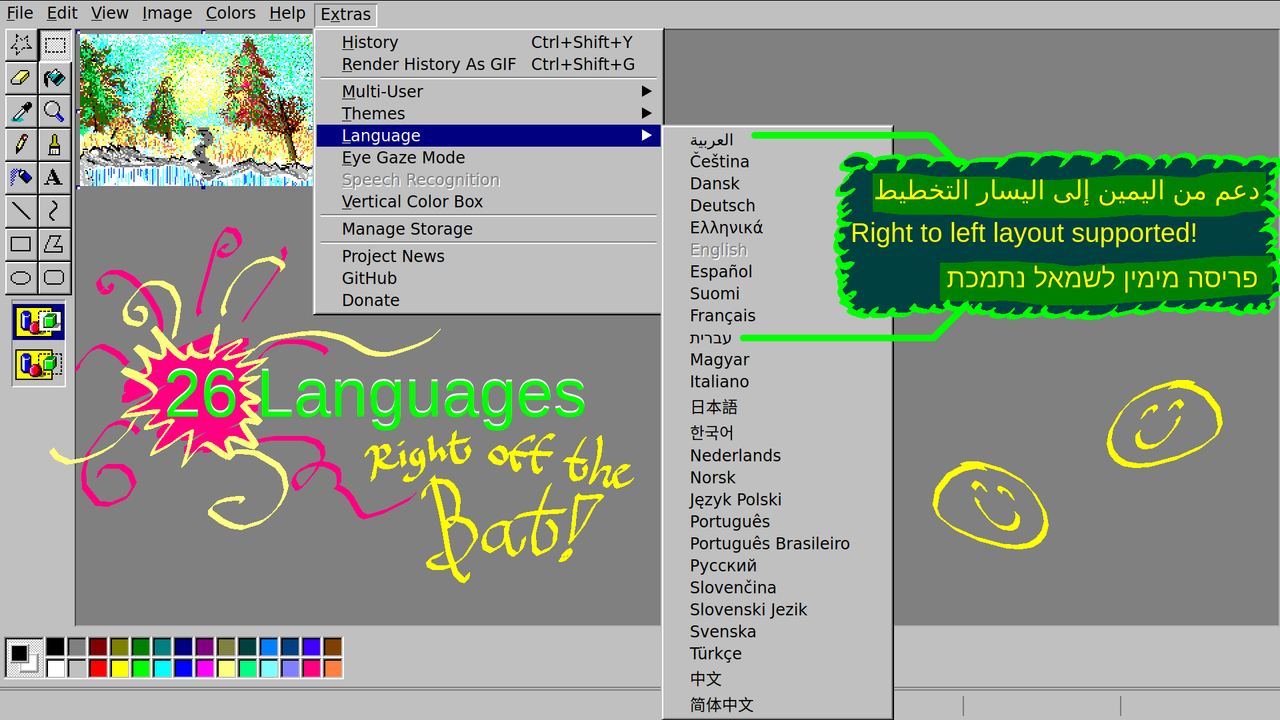
For Arabic and Hebrew, right-to-left layout is supported!
I tried my hand at some Arabic calligraphy…
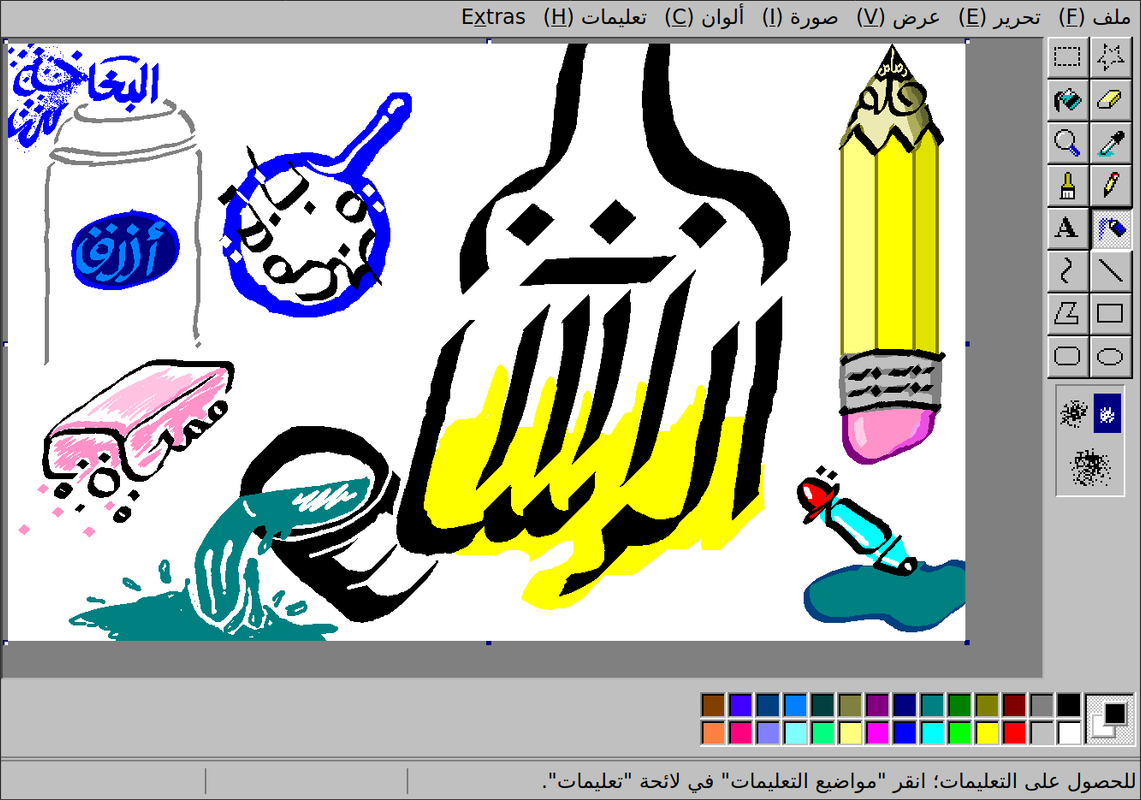
If you want to contribute translations, get in touch!
I need to do some technical work to set up for community translations on a public platform,
but I’m glad people have already expressed interest in helping translate!
(I also want to simplify the language in various parts of the UI before asking people to translate them.)